Playbook: Wire the Gate into CI
Scenario and intended reader
Your repository passes sicario verify locally, and you want the same gate
to run on every pull request in GitHub Actions — red when a finding exists,
green after the fix — so governance stops depending on contributors
remembering to run it. This playbook wires the shipped workflow template
into a repository, walks one red-to-green cycle, and shows where the
evidence artifacts land in CI.
Intended reader: the engineer setting up CI for a SicarioSpec-governed repository. For diagnosing an unfamiliar failure once CI is red, use the Investigate a failing gate playbook in this section; this playbook stages a known failure on purpose.
Starting state
- A repository initialized with
sicario initat SicarioSpec 0.6.0 (captured with--profile appsec), committed to git, hosted on GitHub, withsicario verify .passing locally. - A shell with Python 3.9+ and the SicarioSpec CLI installed. If
sicariois not on your PATH, usepython3 -m sicario_cli.cli— for examplepython3 -m sicario_cli.cli verify .. - Permissions to push branches and open pull requests on the repository.
Assumed platform: macOS or Linux with a POSIX shell and git. GitHub Actions behavior is platform-independent.
Reconstructed exactly for the local (non-GitHub) parts of this playbook — this is also what the docs verification runner does, see FR-051:
sicario init . --profile appsec
Steps
1. Confirm the workflow is present — or wire it in
sicario init installs the CI workflow for you. Check:
cat .github/workflows/sicario-verify.yml
name: sicario-verify

on:
  pull_request:
  merge_group:
  push:
    branches: [main]

permissions:
  contents: read

jobs:
  verify:
    name: SicarioSpec verify
    runs-on: ubuntu-latest
    steps:
      - uses: actions/checkout@9c091bb21b7c1c1d1991bb908d89e4e9dddfe3e0 # v7
      - uses: actions/setup-python@5fda3b95a4ea91299a34e894583c3862153e4b97 # v7.0.0
        with:
          python-version: "3.11"
      # Installs SicarioSpec itself (not this repository) pinned to the
      # release your governance is authored against. The pin IS the version
      # whose rules you get: bump the tag here when you upgrade SicarioSpec.
      - run: python -m pip install "git+https://github.com/dfirs1car1o/sicario-spec.git@v0.6.0"
      - run: sicario verify .
If the file is absent — a brownfield repository that adopted SicarioSpec
without a full init, or a repo that pruned its workflows — copy the shipped
template from the SicarioSpec source, workflow_templates/sicario-verify.yml,
into place:
mkdir -p .github/workflows
cp <path-to-sicario-spec-checkout>/workflow_templates/sicario-verify.yml .github/workflows/
(Replace <path-to-sicario-spec-checkout> with wherever you cloned or
installed SicarioSpec from. The template is identical to the file shown
above.)
2. Read the workflow before trusting it
Four facts matter:
- Triggers:
pull_request,merge_group, andpushtomain— the gate runs before merge, inside merge queues, and on what actually landed. - Permissions:
contents: readonly. The job can read the checkout and nothing else — no token with write scope is exposed to the gate. - The gate step is
sicario verify .— the lastrun:line. It exits0on a clean repository and non-zero when any finding exists, and that exit code alone is what fails the job. There is no separate reporting layer to disagree with your local run: CI red means the same command you run locally would be red. - The install step installs SicarioSpec itself, pinned.
python -m pip install "git+https://github.com/dfirs1car1o/sicario-spec.git@v0.6.0"installs the gate regardless of what your own repository's packaging declares, and pins it to the release your repository is governed by — an unpinned install could otherwise pull a newer gate whose findings differ from the version your repository was authored against. Bump the@v0.6.0ref when you deliberately upgrade SicarioSpec.
If your .github/workflows/sicario-verify.yml still reads
python -m pip install -e ., it was copied from a template shipped before
0.6.1: that line installed your project, not SicarioSpec, and the
sicario command was absent unless your project happened to declare
sicario-spec as a dependency. Replace it with the pinned install line
above.
3. Commit, push, and watch the first green check
git add .github/workflows/sicario-verify.yml
git commit -m "ci: add sicario-verify gate"
git push
Open a pull request for any branch after this lands on your default branch.
The Checks panel on the PR shows sicario-verify / SicarioSpec verify.
This surface is graphical — the capture below comes from the reference
repository's Actions run.
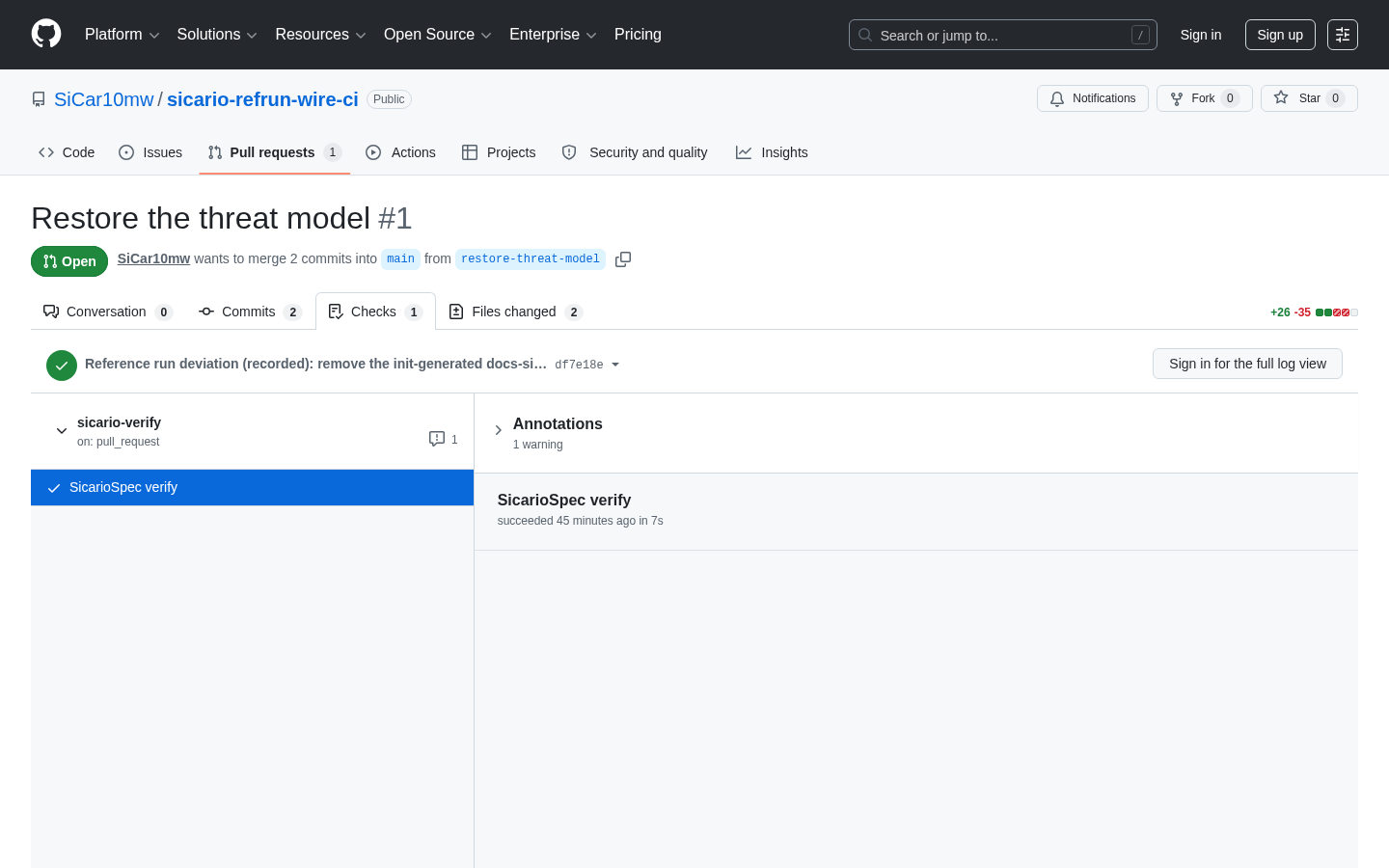
Capture class: tool-captured (FR-030b) — automated browser capture of the real rendered page, taken logged-out. Reference run: SiCar10mw/sicario-refrun-wire-ci, captured 2026-07-30 at captured-version 0.6.0; PR #1 — the reference run's fix branch is named restore-threat-model where this playbook uses demo/red-gate. Re-performable by re-running the reference repository's documented steps and re-capturing.
4. Stage a failing finding and watch the check go red
On a branch, deliberately break one governed invariant — delete the threat
model (git restores it in step 5, and nothing secret-shaped is involved):
git checkout -b demo/red-gate
rm docs/security/threat-model.md
git commit -am "demo: stage a failing gate"
git push -u origin demo/red-gate
Open a pull request from demo/red-gate. The sicario-verify check fails.
What CI ran is exactly what you can run locally; the job log's final step
shows (reproduced, for the local parts only, as):
rm docs/security/threat-model.md
sicario verify .
HIGH SICARIO-MISSING-THREAT-MODEL docs/security/threat-model.md: Missing docs/security/threat-model.md
sicario verify failed with 1 finding(s)
The command exits 1, the step fails, and the job — therefore the check —
goes red. Each finding line reads: severity, finding code, path, message.
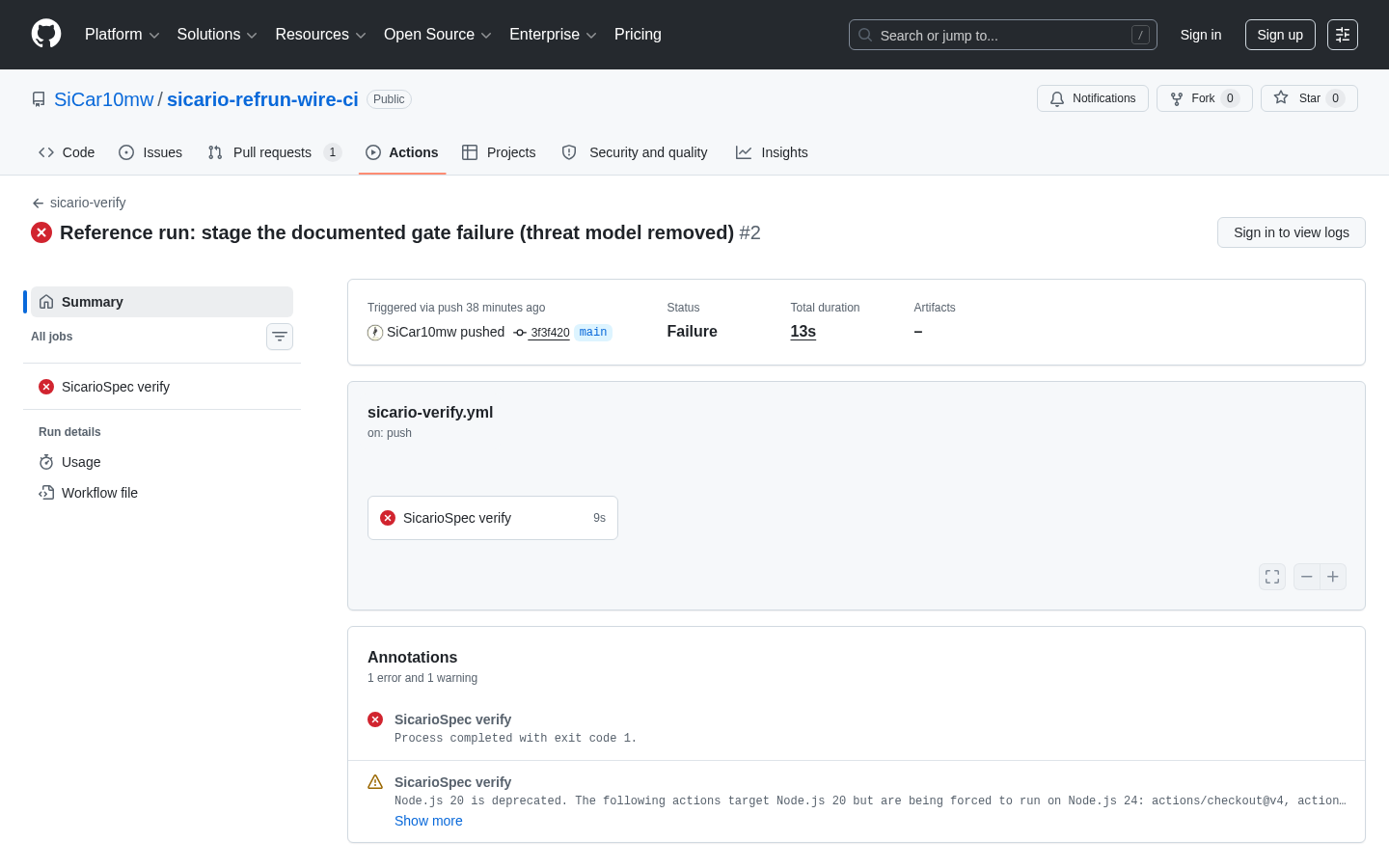
Capture class: tool-captured (FR-030b) — automated browser capture of the real rendered page, taken logged-out. Reference run: SiCar10mw/sicario-refrun-wire-ci, captured 2026-07-30 at captured-version 0.6.0; run 30563433822 — in the reference run the failure was staged by a push to main rather than a PR branch; same workflow, same red, same exit-code-1 annotation. Re-performable by re-running the reference repository's documented steps and re-capturing.
5. Fix and re-run to green
Restore the file and push; the check re-runs automatically:
git checkout main -- docs/security/threat-model.md
git commit -am "demo: restore threat model"
git push
The local equivalent of what CI now runs (reproduced, for the local parts
only, by re-running the idempotent init that recreates the missing file):
sicario init . --profile appsec
sicario verify .
sicario verify passed
Exit code 0; the sicario-verify check on the pull request turns green.
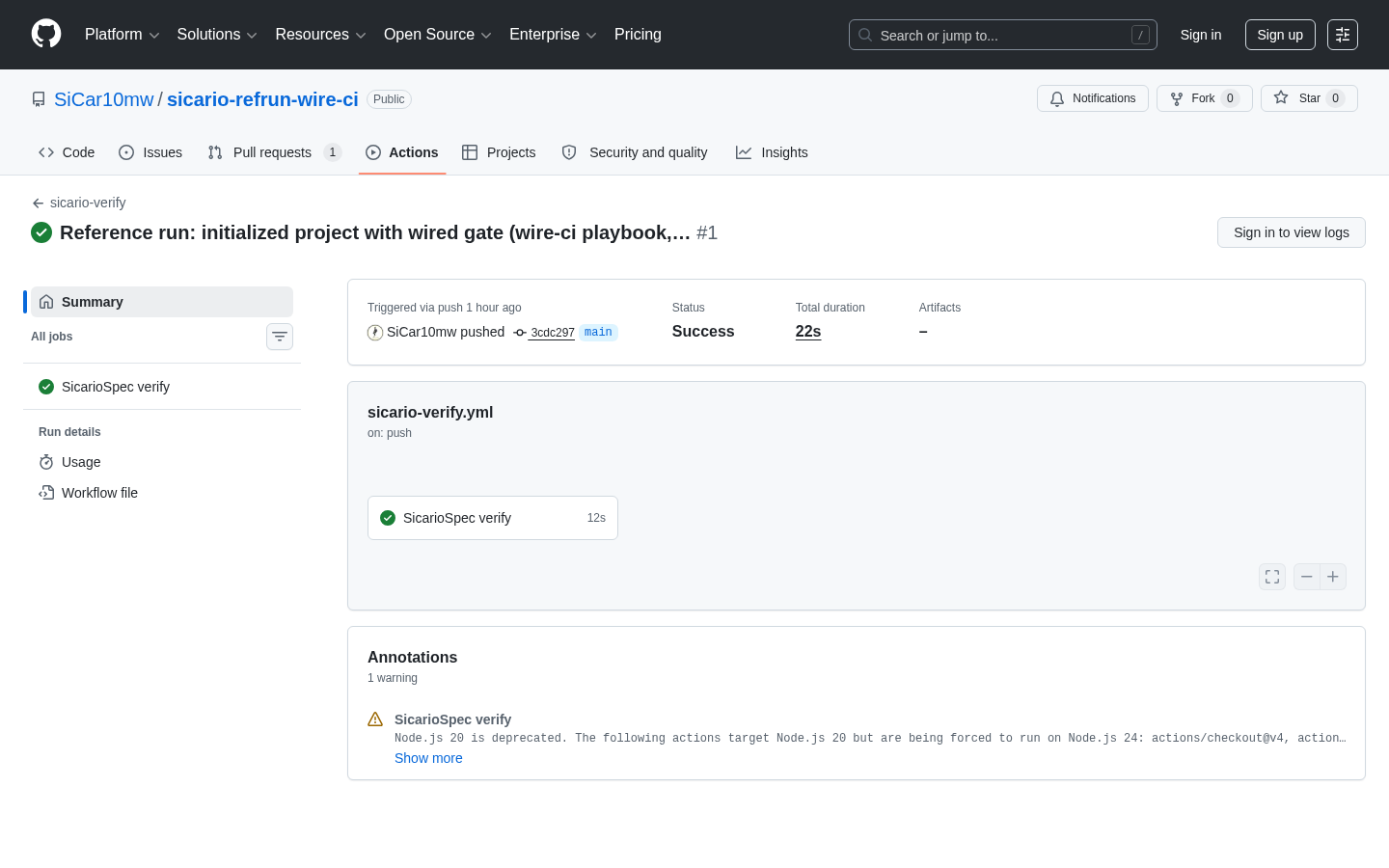
Capture class: tool-captured (FR-030b) — automated browser capture of the real rendered page, taken logged-out. Reference run: SiCar10mw/sicario-refrun-wire-ci, captured 2026-07-30 at captured-version 0.6.0; run 30563339414 — the reference run's wired-baseline passing run of this same job; its post-fix green appears as the check in the PR-panel capture above. Re-performable by re-running the reference repository's documented steps and re-capturing.
6. Know where the evidence artifacts land in CI
Every sicario verify . run — in CI exactly as locally — writes two
evidence files into the checkout it verified:
generated/sicario/gate-summary.json— verdict, findings, and thescan_coveragerecord (see Read gate evidence as a reviewer).generated/sicario/spec-run-evidence.json— the evidence-path index.
In CI these land in the runner's workspace and disappear with it: the shipped template deliberately does not upload them, because the check's verdict is the exit code and the log carries the finding lines. If your review process wants the evidence retained per run, add an upload step — an optional addition to the template, not shipped behavior:
      - uses: actions/upload-artifact@v4
        if: always()
        with:
          name: sicario-evidence
          path: generated/sicario/
if: always() matters — the evidence of a failing run is the copy
reviewers most need.
7. Make the check required
A green check that can be ignored is advisory, not a gate. In the
repository settings, add SicarioSpec verify to the required status checks
for your protected branch, so merging is blocked while the gate is red.
See repository settings for the repository's
recommended protection posture.
Success check
You are done when all of the following hold:
.github/workflows/sicario-verify.ymlexists on the default branch and its final step issicario verify ..- A pull request that deletes
docs/security/threat-model.mdshows thesicario-verifycheck red, and the job log contains theSICARIO-MISSING-THREAT-MODELfinding line. - Restoring the file turns the same check green without any workflow change.
- The check is listed as required on the protected branch.
About the output quoted in this playbook
Every quoted block above is labeled verified (re-executable and compared
against a real run) or illustrative (representative). Terminal output was
captured from a reference run on a net-new repository (refrun-ci, run
date 2026-07-28, SicarioSpec 0.6.0, module form python3 -m sicario_cli.cli
from the source checkout), with working-directory paths normalized to
~/work/<repo>. The three GitHub Actions surfaces are graphical and carry
tool-captured assets from the hosted reference-run repository
SiCar10mw/sicario-refrun-wire-ci (captured 2026-07-30, logged-out browser
automation of the public pages);
no step depends on those images.